Introduction
Email, short for electronic mail, is a modern method of exchanging messages using electronic devices. Invented by Ray Tomlinson, it has become the world's fastest and cheapest communication service. Whether for personal use or professional business, email allows people to send text, images, and files across the globe instantly. To use this service, one must create an account with providers like Gmail, Yahoo, or Outlook.
| Component | Function | Example |
|---|---|---|
| Inbox | Stores received emails | Unread messages appear here |
| Sent | Keeps a copy of emails you’ve sent | “Email sent to teacher” |
| Drafts | Stores unfinished emails | “Half-written assignment email” |
| Trash / Deleted Items | Holds removed emails temporarily | “Deleted spam mail” |
| Spam / Junk | Filters unwanted or suspicious emails | “Promotional offers” |
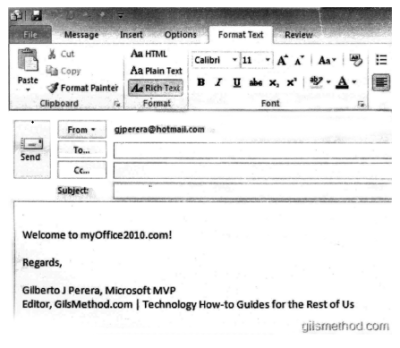
| Compose Window | Used to write a new email | Includes To, Cc, Bcc, Subject, Body |
| Formatting Tools | Allows text styling | Bold, Italics, Underline |
| Attachment Option | Adds files to email | Attach PDF or image |
| Send Button | Sends the composed email | Click “Send” after writing |
| Search Bar | Finds specific emails | Search by sender or subject |
| Folders / Labels | Organizes emails into categories | Work, Personal, School |
| Reply / Forward | Responds or shares an email | Reply to teacher, forward to friend |
Components of an Email Interface including folders and composition tools.
Explanation Step by Step
To send an email, you first need to log into your account using a secure password. Once inside, you can navigate through various folders:
- Inbox: Where you receive incoming mail.
- Sent: A record of messages you have sent.
- Drafts: Where unsaved or unfinished emails are kept.
- Spam: A folder for unwanted or junk advertisements.
Writing an email involves filling in the recipient's address, a clear subject line, and the main message body. You can also "attach" digital files like photos or documents to your message.
Sub-topics
Creative writing - Email
Writing an email requires a clear structure. This includes the recipient's address, a concise subject line that explains the purpose of the mail, and the body of the message. Unlike traditional letters, emails allow for "attachments," where you can add photos, documents, or audio files to your text message.
Examples
Example 1: Basic Email Setup
Tricky Example (Real-Life Scenario)
Tricks and Shortcuts
- Subject Line First: Always write the subject line before the body so you don't forget it; a clear subject helps the receiver find your mail easily.
- Draft Saving: If you are interrupted, simply close the window. Most email services auto-save your work in the "Drafts" folder.
Common Mistakes
- Wrong Recipient: Typing "gmial.com" instead of "gmail.com". Always double-check the spelling of the email address.
- Forgetting Attachments: Mentioning "I have attached the file" in the text but forgetting to actually click the attach button.
Practice Questions (MCQs)
Easy Questions
- Who is known as the inventor of email?
A) Bill Gates
B) Ray Tomlinson
C) Steve Jobs
D) Mark Zuckerberg
(Direct Question) - Which of these is a free email service provider in India?
A) WhatsApp
B) Gmail
C) Instagram
D) Facebook
(Real-life Example) - Tricky Question: If you receive an unwanted advertisement for a product you never asked for, which folder will it likely be in?
A) Inbox
B) Starred
C) Spam
D) Sent
Medium Questions
- What is the primary purpose of the "Drafts" folder?
A) To store deleted emails
B) To store received messages
C) To store unsent, saved messages
D) To block hackers
(Conceptual) - Which of the following can be attached to an email?
A) Only text files
B) Only photographs
C) Audio, video, and spreadsheets
D) Physical objects
(Real-life Utility) - Tricky Question: You want to send an email to a friend, but you don't know their password. Can you still send the email?
A) No, you need their password to send it.
B) Yes, you only need their email address.
C) No, you need your own password and their password.
D) Only if they are online.
Hard Questions
- Why is email considered the "cheapest" mail service compared to traditional post?
A) Because computers are free.
B) Because it uses the internet to send data instantly without stamps or paper.
C) Because the government pays for all emails.
D) Because it only works for short distances.
(Conceptual) - Tricky Question: An email address is "student.help@school.org". Which part of this address is the "domain" or service provider?
A) student.help
B) @
C) school.org
D) . (the dot) - Real-life Scenario: You are applying for a job via email. Which folder should you check to 100% confirm that your application actually left your computer?
A) Outbox (if it's still there, it's not sent)
B) Sent folder
C) Drafts
D) Inbox
(Real-life Logic)
Revision Summary
Email is a fast, cheap, and electronic way to communicate globally. Every account is protected by a password and organized into folders like Inbox and Spam. We can send not just text, but also various file attachments. Remember to always provide a clear subject line and double-check the recipient's address to avoid common errors.
The number '11' is related to